Plugchoice

OCPP Proxy

The part that puts choice in Plugchoice.

Run Plugchoice in parallel to your billing or backoffice platform. Connect and disconnect operators without losing access to your hardware. Stay flexible, always.

ABB TerraOCPP 1.6Alfen EveOCPP 1.6Easee HomeOCPP 1.6Wallbox PulsarOCPP 1.6PlugchoiceOCPP Proxy
Plugchoicealways on
Web PortalApp
OCPP Operators

Why this matters

$

Freedom of choice

  • Pick the best billing, analytics or automation platform for each use case.
  • Mix and match platforms across your fleet.
  • No single-vendor dependency for your operations.
Read-only

Freedom to leave

  • Disconnect any platform with a single action.
  • Your chargers stay connected to Plugchoice.
  • No re-commissioning, no downtime, no lock-in.

Runs in parallel

  • No need to migrate away from your current platform.
  • Plugchoice works alongside existing systems.
  • Zero disruption to ongoing operations.

99.98%

Uptime

Everything

Logged

Real-time

Observability

We thought of everything.

  • Role-based access

    Assign roles to each operator and control what they can do, including which charging cards are accepted or rejected.

  • Offline resilience

    When an operator goes offline, we keep everything in sync until it reconnects.

  • Message buffering

    OCPP messages are buffered and cached so nothing gets lost.

  • Message filtering

    Filter and control which messages are forwarded and at what rate.

  • Priority rules

    Built-in priority rules prevent connected systems from overruling each other.
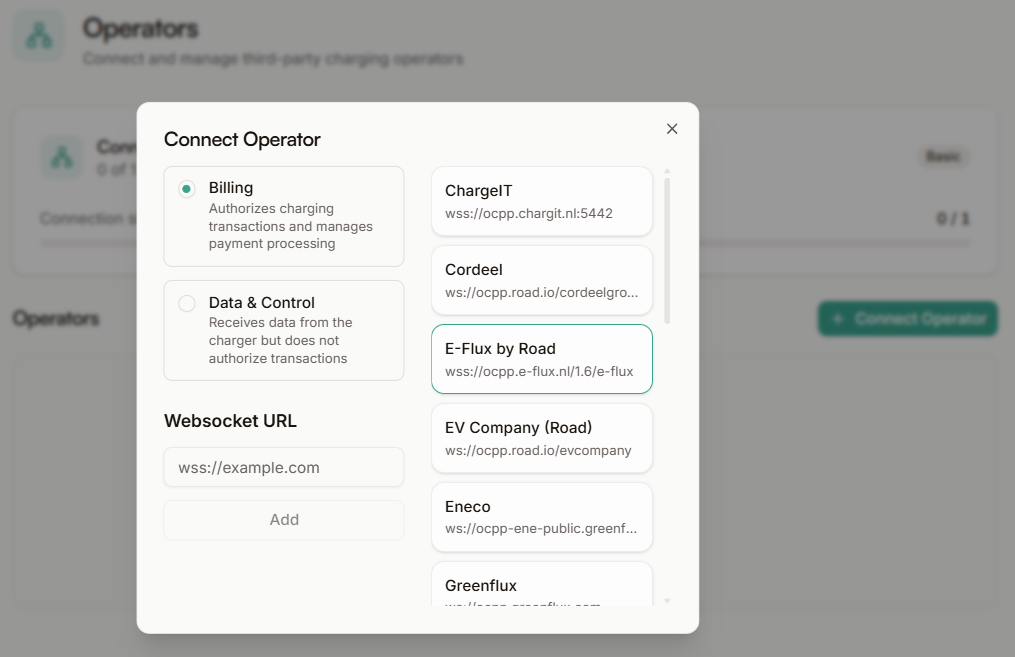
Plugchoice web portal OCPP operator routing configuration

Keep your fleet flexible.

No lock-in. Free to use. Works with any OCPP hardware.

Frequently asked questions

Is the OCPP Proxy really free?
Yes. The OCPP Proxy is included in every Plugchoice account at no cost. There are no usage fees, no per-charger charges and no hidden limits.
Can I use Plugchoice with my existing billing platform?
Absolutely. That is exactly what the OCPP Proxy is designed for. Connect your chargers to Plugchoice, then route OCPP traffic to your current billing platform. Both systems run in parallel.
Can I route to multiple platforms at the same time?
Yes. You can connect multiple OCPP operators simultaneously with different roles. For example, one operator for billing and another for data analytics.
What happens if I disconnect a platform?
Your chargers remain fully operational through Plugchoice. The portal, apps and diagnostics continue to work. Only the OCPP routing to that specific operator stops.
Do you support my platform?
The OCPP Proxy works with any platform that speaks OCPP. We are aware of hundreds of compatible operators. Check our integrations page for a current overview, or contact us if you have a specific question.
Do I need to migrate away from my current system?
No. Plugchoice runs alongside your existing setup. There is no migration required. You can start using Plugchoice features while keeping your current platform connected.
When should I use the REST API instead?
Use the REST API when you need to integrate with systems that don't speak OCPP, such as custom dashboards, internal tools, home automation or CRM systems. The OCPP Proxy is for connecting OCPP-native platforms.